

MCP requires Page Generator Pro 6, available Monday 7th September 2026 23:59 UTC.
This page lists what Page Generator Pro’s MCP server exposes to a connected AI client:
- Prompts: guided, ready‑made workflows you start that are provided by Page Generator Pro.
- Tools: the individual actions the AI can perform.
- Resources: reference material the AI reads to understand your site and the Plugin.
You don’t need to memorise any of this. You describe what you want in plain language and the AI chooses the right tools — the tables below are a reference for what’s possible, with example prompts you can copy.
Tool and resource names below use the page-generator-pro prefix. If you’ve white‑labelled the Plugin, the prefix matches your Plugin’s name.
Prompts
Prompts are the fastest way to get results. A prompt is a guided workflow you start; it walks the AI through creating the Keywords and Content Group, building rich page content, test‑generating a page for you to review, and then generating the full set.
Prompts are user‑initiated — you pick one; the AI doesn’t run them on its own. How you access them depends on your client:
- Claude Code — type
/mcp__page-generator-pro__<prompt>, e.g./mcp__page-generator-pro__services-in-locations. - Claude Desktop
- Click the “+” / attachments
- Click Connectors > Add from page-generator-pro > select the prompt.
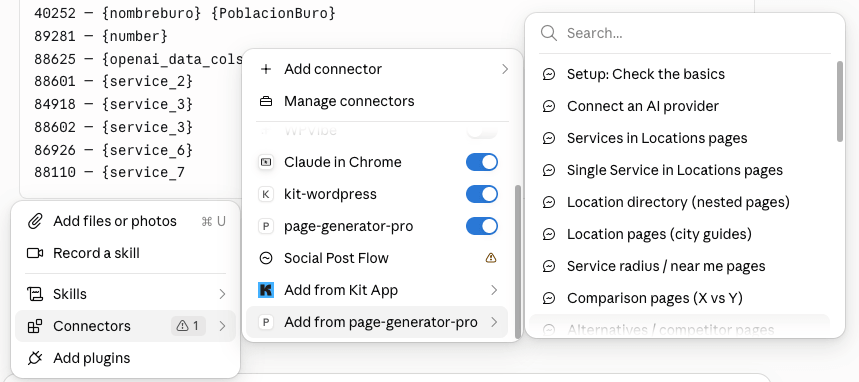
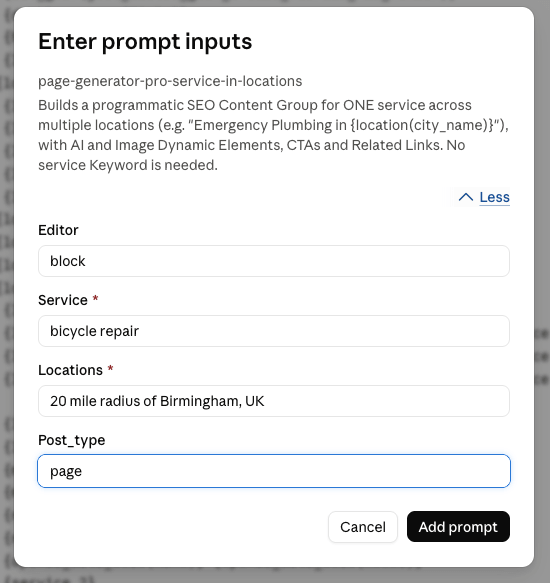
- Enter any prompt inputs, if presented
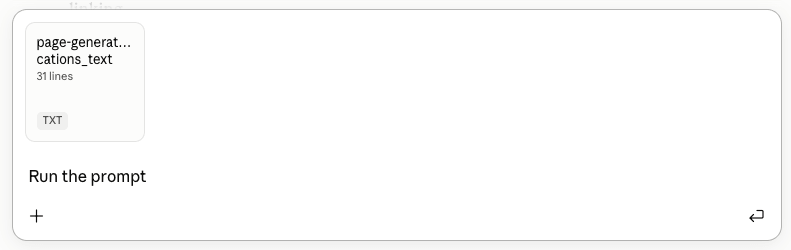
- Tell the AI client to run the prompt
- Cursor and others — the prompt/command picker.
To see the full catalogue at any time, ask your client to read the page-generator-pro://prompts resource, by either:
- Claude Desktop:
- Click the “+” / attachments
- Click Connectors > Add from page-generator-pro > select the Prompt Catalog prompt.

- Tell the AI client to list the available prompts
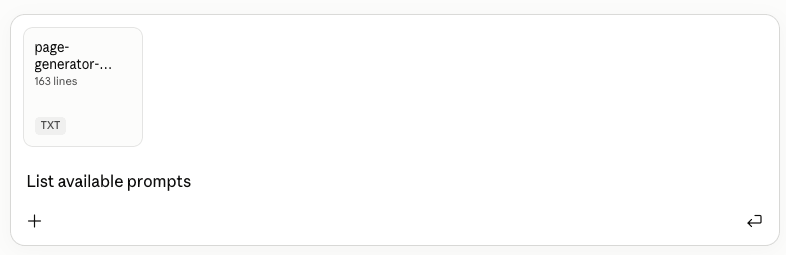
- Using the prompt/command picker in your AI client
- Asking your AI client “What Page Generator Pro prompts are available?”
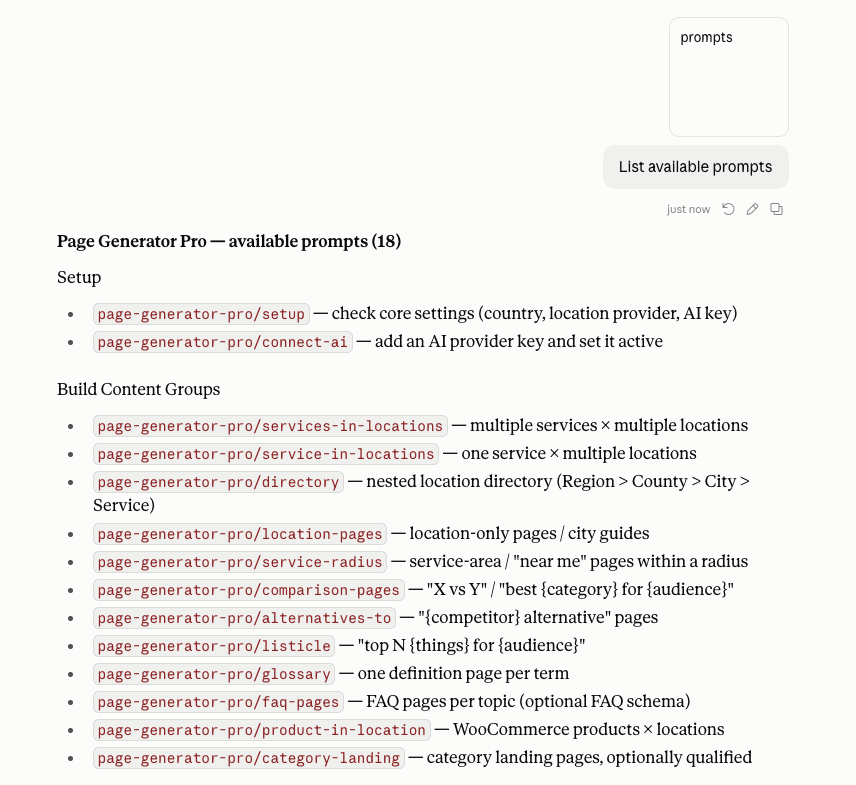
Prompts listed below are a guide, and may be out of date due to continued development and improvement of prompts and Page Generator Pro. It’s recommended to follow the above steps to fetch the prompts that are available to your AI client.
Onboarding
| Prompt | What it does |
|---|---|
setup | Checks your core settings (country code, location provider, AI provider key) and walks you through fixing anything missing. |
connect-ai | Guides you through adding an AI provider API key so AI Dynamic Elements can generate content. |
Local SEO
| Prompt | What it builds |
|---|---|
services-in-locations | Pages for multiple services across multiple locations (e.g. “{service} in {city}”). |
service-in-locations | Pages for one service across multiple locations. |
service-radius | “Near me” / radius pages for towns within a distance of a base location. |
directory | A hierarchical location directory (Region › County › City › Service and variants) with linked, nested pages. |
location-pages | Location‑only pages — city guides, “things to do in {city}”, neighbourhood pages. |
Comparison
| Prompt | What it builds |
|---|---|
comparison-pages | “X vs Y” / “best {category}” comparison pages. |
alternatives-to | “{competitor} alternative” pages positioning your product. |
Listings
| Prompt | What it builds |
|---|---|
listicle | “Top N {things}” listicle pages. |
glossary | Glossary / definition pages, one per term. |
faq-pages | FAQ pages per topic (suitable for FAQ schema). |
Products
| Prompt | What it builds |
|---|---|
product-in-location | Product‑in‑location pages (WooCommerce or landing pages). |
category-landing | Category landing pages. |
Utility
| Prompt | What it does |
|---|---|
duplicate-and-localize | Clones an existing Content Group to a new area, list of locations, or language. |
audit-content-group | Reviews a Content Group for SEO/quality gaps and reports recommendations (read‑only). |
improve-content-group | Proposes and applies improvements to an existing Content Group. |
add-related-links | Adds a Related Links element to an existing Content Group. |
Tools
Tools are the individual actions the AI performs. Example prompts show the kind of thing you can ask; you rarely name a tool yourself.
Keywords
| Action | Example prompt |
|---|---|
| List Keywords | List my keywords. |
| Get a Keyword | Show me the terms in the “cities” keyword. |
| Create a Keyword | Create a keyword called “services” with these terms: Boiler Repair, Boiler Installation, Emergency Plumbing. |
| Create an AI Keyword | Use OpenAI to create a keyword of 50 UK city names. |
| Create a location Keyword | Create a location keyword for towns within 20 miles of Birmingham. |
| Update a Keyword | Add “Gas Safety Check” to the “services” keyword. |
| Delete a Keyword | Delete the “test” keyword. |
Content Groups
| Action | Example prompt |
|---|---|
| List Content Groups | List my content groups. |
| Get a Content Group | Show me the settings for content group 1234. |
| Create a Content Group | Create a content group titled “{service} in {city}”. |
| Build page content (scaffold) | Scaffold a feature‑rich “service in location” page for the Block editor. (see below) |
| Update a Content Group | Change content group 1234 to publish as draft. |
| Import a Page/Post as a Content Group | Import page 88 as a content group. |
| Test generate a preview | Test generate one page from content group 1234 so I can review it. |
| Generate content | Generate all pages for content group 1234. |
| Check generation status | Is content group 1234 still generating? How many are done? |
| Trash / delete generated content | Move all pages generated by content group 1234 to trash. |
| Delete a Content Group | Delete content group 1234. |
Content Group Scaffold
The scaffold builds complete, feature‑rich Content Group content from a template, for your chosen editor. The returned content already includes an AI‑written section, an image, Related Links, a map and calls to action — correctly formatted — so nothing is missed. Available templates: service-in-location, location-guide, comparison, listicle, glossary, faq-pages, product-in-location, category-landing.
| Action | Example prompt |
|---|---|
| Scaffold a page | Build a “service in location” page for the Block editor using my “services” and “locations” keywords. |
| Choose the editor | The scaffold asks whether your site uses the Block or Classic editor. |
Dynamic Elements
Insert any Page Generator Pro Dynamic Element (as a shortcode or block) into your content. This includes AI text (OpenAI, Claude, Gemini, Grok, DeepSeek, Groq, Mistral, Perplexity and more), AI/stock images (OpenAI Image, Gemini AI Image, Ideogram, Midjourney, Pexels, Pixabay and more), Related Links, Google Map, OpenStreetMap, Google Places, YouTube, Wikipedia, Yelp and Custom Fields.
| Action | Example prompt |
|---|---|
| Add AI text | Add an AI paragraph about {service} in {city} to this content group. |
| Add an AI image | Add a Gemini AI image of {service} in {city}. |
| Add Related Links | Add related links so each page links to the others. |
| Add a map | Add a Google Map centred on each town. |
Settings
Read and update Plugin settings. API keys and other secrets are never shown or writable through MCP.
| Action | Example prompt |
|---|---|
| Read settings | What’s my default country code and location provider? |
| Update settings | Set the default country code to GB. |
Settings are grouped as: General, Generate, Generate: Locations, Integrations, Research and Spintax.
Resources
Resources are reference documents the AI reads to understand your site and the Plugin. You don’t call these directly — the AI reads them as needed — but you can ask it to show you any of them.
| Resource | Contents |
|---|---|
page-generator-pro://overview | What the Plugin does and the core workflow. |
page-generator-pro://prompts | The catalogue of Prompts and their arguments. |
page-generator-pro://content-groups/workflow | The create → generate → clean‑up lifecycle and generation methods. |
page-generator-pro://content-groups/fields | Every Content Group field. |
page-generator-pro://content-groups/dynamic-elements | The available Dynamic Elements and their attributes. |
page-generator-pro://content-groups/editors | The editors the scaffold can target (Block, Classic). |
page-generator-pro://content-groups/templates | The scaffold’s page templates. |
page-generator-pro://keywords/sources | The available Keyword Sources. |
page-generator-pro://keywords/syntax | Keyword and Spintax syntax. |
page-generator-pro://settings | The Plugin settings reference. |